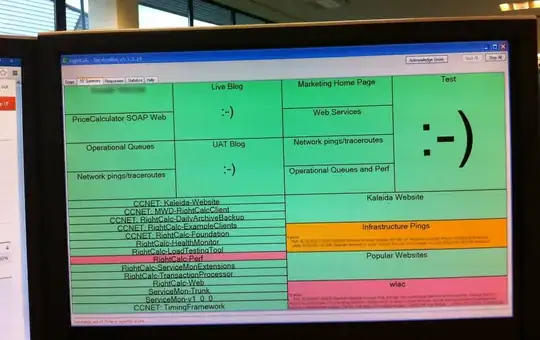
To give you an example, here's a photo of one of our team's automated Information Radiators, which provides a continually present summary of metrics important to us. Each part of this screen is dedicated to monitoring a different aspect of our development pipeline or operational systems.
The bottom left quadrant contains the status of our CruiseControl.NET builds. If a developer commits code to the source code repository that fails to compile, fails the automated tests or cannot be automatically deployed, a segment will become red. Across the top are sections for each staging environment: internal test (alpha), UAT (beta-testing) and live (production). The display also contains sections for monitoring the performance of key services to provide early warning of application or infrastructure issues.
We've found this ability to visualise the system in real-time gives us a greater feel for the system's characteristics and as a team it's enabled us to become more proactive in preventing potential issues. Also, it's a great talking point that helps increase our project's exposure to other teams as they pass by.
from: https://serverfault.com/questions/431981/monitor-a-web-service-hosted-at-http-url/433758#433758


